Compound Cascading Filter
A case management team files each document under a document type. The list of types depends on two independent choices: "Case or Member", and "Document Category". The built-in Filter behavior narrows one list from one choice. This recipe uses two Filter behaviors to fill two hidden helper lists, then a Custom Behavior keeps only the types both lists share.
At a glance
- Extension point Custom Index Behavior, with built-in Source Lookup and Filter behaviors
- You need A SQL source table that links each document type to a case-or-member value and a category; five DropDownList fields (below); permission to edit content types in the Connections app
- Teaches Reading
Choicesthat a Filter behavior has set, behavior order on one field, intersecting two lists
Set it up
All configuration is on one content type in the Connections app. Each row of the source table links a document type name to a case-or-member value and a category:
| Key | Name | Association | Category |
|---|---|---|---|
| 11 | Authorization Form | Case | Administrative Requirements |
| 12 | Representative ID | Case | Administrative Requirements |
| 13 | Enrollment Form | Member | Administrative Requirements |
| 14 | Income Statement | Member | Financial Records |
| 15 | Bank Statement | Case | Financial Records |
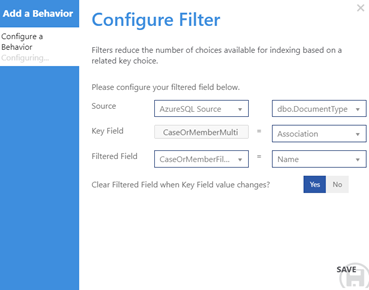
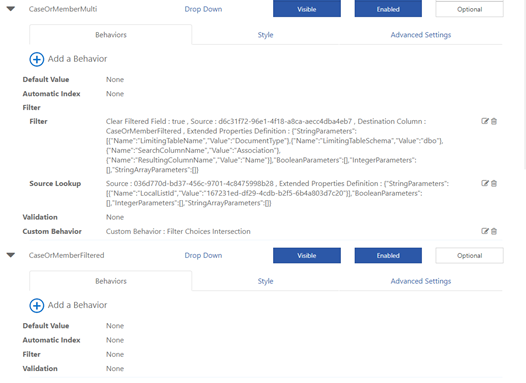
CaseOrMemberMulti(DropDownList). Add a Source Lookup behavior on a table that holds onlyCaseandMember. Add a Filter behavior that sets the choices ofCaseOrMemberFilteredto the matching type names.
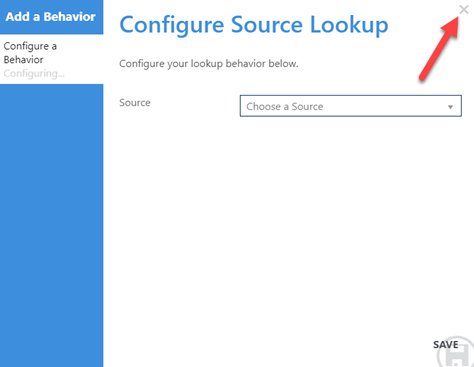
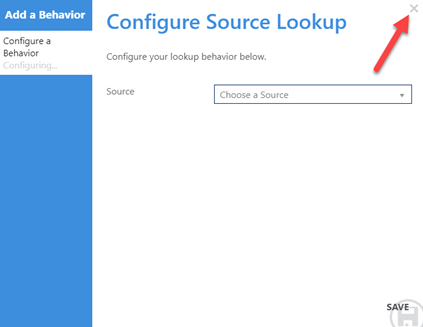
CaseOrMemberFiltered(DropDownList, hidden). In the wizard, close the Configure Source Lookup page with the X. The Filter behavior above sets its list.
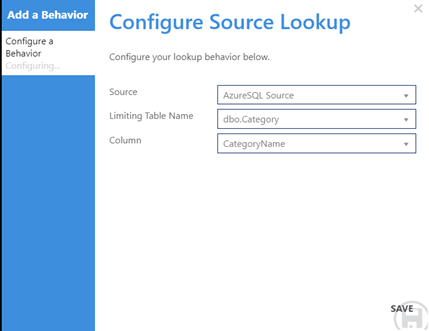
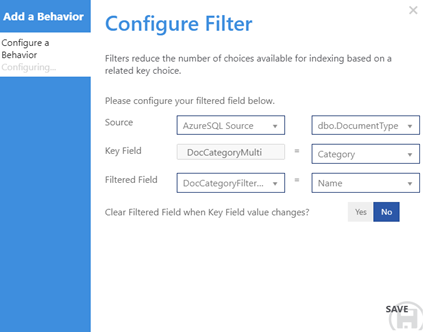
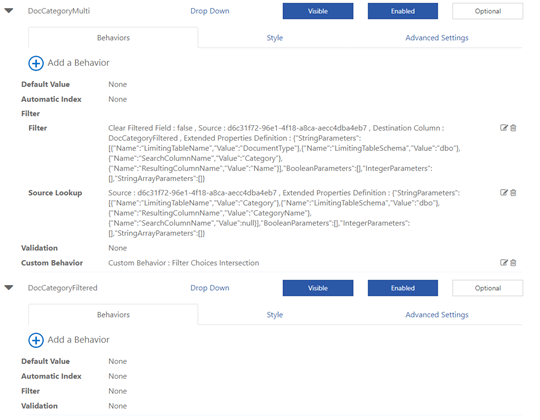
DocCategoryMulti(DropDownList). Add a Source Lookup behavior on a table of category names, and a Filter behavior that sets the choices ofDocCategoryFiltered.
DocCategoryFiltered(DropDownList, hidden). Leave its source empty, as in step 2.
DocTypeMulti(DropDownList). The final list the user picks from.- Add the Custom Behavior below to both
CaseOrMemberMultiandDocCategoryMulti. On each field, select Change Behavior Order and put it after the Filter behavior, so it reads the list the Filter has set.
Script
Custom Behavior on CaseOrMemberMulti and DocCategoryMulti
// Attach to: CaseOrMemberMulti and DocCategoryMulti, after the Filter behavior on each
// Reads: choices of CaseOrMemberFiltered and DocCategoryFiltered, DocTypeMulti.
// Writes: choices and value of DocTypeMulti.
var caseChoices = panel["CaseOrMemberFiltered"].Choices || [];
var categoryChoices = panel["DocCategoryFiltered"].Choices || [];

if (caseChoices.length > 0 && categoryChoices.length > 0) {
    var shared = [];
    for (var i = 0; i < caseChoices.length; i++) {
        if (categoryChoices.indexOf(caseChoices[i]) !== -1) {
            shared.push(caseChoices[i]);
        }
    }
    builder.SetFieldChoices("DocTypeMulti", shared);

    // Clear a selection that is no longer in the list.
    var current = panel["DocTypeMulti"].RuntimeValue || "";
    if (current !== "" && shared.indexOf(current) === -1) {
        builder.SetFieldRuntimeValue("DocTypeMulti", "", true);
    }
}
How it works
- Behaviors on one field run in order, and each waits for the one before it. When the Custom Behavior runs, the Filter has already replaced the helper field's choices.
Choicesholds the display text of each choice. The script keeps the names that appear in both helper lists.SetFieldChoiceswrites the shared names toDocTypeMulti, and a selection that no longer fits is cleared.- Until the user picks in both dropdowns, one helper list is empty and the script changes nothing.
Test it
- Open a document of this content type in the Index app.
- Select
CaseinCaseOrMemberMulti. Select a category inDocCategoryMulti.
You are done when DocTypeMulti lists only the document types that match both choices, and changing either choice updates the list.
What can go wrong
Watch out
DocTypeMultidoes not narrow. The Custom Behavior runs before the Filter on that field. Fix Change Behavior Order.- "Could not retrieve data from source." under a dropdown. A Source Lookup or Filter behavior could not query its source. The script cannot fix that. Check the source connection, table and column names in that behavior. See Handle a Failed Lookup in a Cascading Dropdown.
- The final field stores display text.
SetFieldChoicesstores each string as both display text and value. If your source has separate display and value columns, the final field stores the display text. DocTypeMultikeeps its full configured list on load. The script does nothing until both helper lists have entries. ConfigureDocTypeMultiwith no static choices if users must not pick before both dropdowns are set.